
标签问题

-
AuthorPosts
-
 pyro90288780
Joined: Jun 2024 Posts: 5 Location: China  Newcomer
 DrewFinale
Joined: Dec 2019 Posts: 803 Location: United States  Charcoal
你好 pyro90288780,欢迎来到 Finale 3D 社区,感谢发帖!
可以的。在 Finale 3D Pro 版本中,您可以创建自定义标签模板,模板里有一个筛选框。筛选表达式几乎可以使用 Script window 里的任何一列,所以您可以为演出中的任意一部分单独打印一套标签。
您这个情况,用 Type 这一列来筛选就可以:
1. 在 Script window 右上角的蓝色齿轮菜单 ⚙️ 中,选择 Create or edit labels template。
2. 在 Labels Configuration 对话框顶部,找到 Filter search terms or expression 一栏。
3. 输入:parttype = shell
4. 打印。只有符合条件的行才会生成标签。Type 的值始终是英文小写,不会被翻译,所以请输入 shell。
🚨 筛选表达式必须填在 Labels Configuration 对话框里。在 Script window 顶部的筛选栏输入,对打印出来的标签没有任何影响。
文档里有一个右键技巧,可以直接生成筛选表达式,不用自己写,请看 Tricks for search expressions 那一段:https://finale3d.com/documentation/search-expressions/
还有一个专门讲筛选标签的视频:https://finale3d.com/video/filtering-labels/
——————–
Hi pyro90288780, welcome to the Finale 3D community and thanks for posting!
Yes, you can do this. In Finale 3D Pro you can create a custom labels template, and that template has a filter field. The filter can use almost any column in the Script window, so you can print a separate set of labels for any part of your show.
For what you are doing, filter on the Type column:
1. In the blue gear menu ⚙️ at the upper right of the Script window, choose Create or edit labels template.
2. At the top of the Labels Configuration dialog, find Filter search terms or expression.
3. Enter: parttype = shell
4. Print. Only the matching rows produce labels.Type values are always lowercase English and are never translated.
🚨 The filter expression has to go in the Labels Configuration dialog. Typing it into the search box at the top of the Script window has no effect on what labels print.
There is a right-click trick in the documentation that builds filter expressions for you instead of writing them by hand. See the Tricks for search expressions paragraph: https://finale3d.com/documentation/search-expressions/
And there is a video specifically about filtering labels: https://finale3d.com/video/filtering-labels/
pyro90288780Joined: Jun 2024 Posts: 5 Location: China NewcomerDrewFinaleJoined: Dec 2019 Posts: 803 Location: United States Charcoal您的判断是对的。这种情况要按位置筛选,而不是按产品,因为同一个品种在两边都有。
在 Filter search terms or expression 一栏里输入:position != 圆盘
这样这个位置的标签就不会打印出来。请把「圆盘」换成您 Position Name 列里实际使用的名称。如果名称中带有空格,请用引号括起来。
如果要和前面的筛选条件一起用,用 + 连接,+ 表示「并且」:parttype = shell + position != 圆盘
——————–
Your reasoning is right. In this case you need to filter by position rather than by product, because the same product appears in both places.
In the Filter search terms or expression field, enter: position != wheel
That stops labels printing for that position. Replace the name with the one as it appears in your Position Name column. If the name contains a space, put it in quotation marks.
To combine it with the earlier filter, join the two with +, which means AND: parttype = shell + position != wheel
pyro90288780Joined: Jun 2024 Posts: 5 Location: China Newcomerpyro90288780Joined: Jun 2024 Posts: 5 Location: China NewcomerDrewFinaleJoined: Dec 2019 Posts: 803 Location: United States Charcoal表达式本身写法是对的,问题不在语法上。有两个地方需要检查。
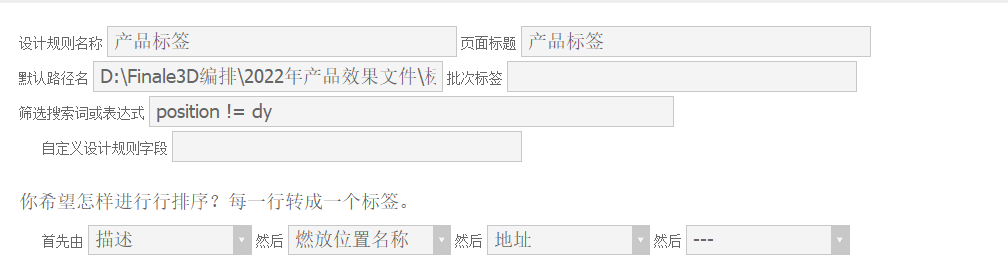
第一,!= 是「完全等于」的否定,只排除名称恰好是 dy 的位置。大小写没有影响,位置名为 DY 时用 dy 一样可以匹配。但如果名称里还有其他字符,例如 DY1、DY-2,就不会被排除。请在 Script window 的 Position 列中,找一个本不该打印却打印出来的行,确认它的位置名称是否与表达式中的 dy 完全一致。如果不一致,请在表达式中改用该列中的实际名称。
第二,自定义内置模板时,Finale 3D 会用您起的名字新建一个模板。打印时请在 File > Labels 菜单中选择「产品标签」。如果选的是内置模板,您设置的筛选条件不会起作用。
如果还是无法解决,请将您的演出文件(.FIN)发送到 support@finale3d.com,我会进一步检查。
——————–
The expression itself is written correctly, so the syntax is not the problem. There are two things to check.
First, != means “not exactly equal to”, so it only excludes a position whose name is exactly dy. Capitalization does not matter, so dy matches a position named DY. But if the name contains anything else, such as DY1 or DY-2, it will not be excluded. In the Position column of the Script window, find one of the rows that printed when it should not have, and check whether its position name matches the dy in your expression exactly. If it does not, use the actual name from that column in the expression instead.
Second, when you customize a built-in template, Finale 3D creates a new template under the name you gave it. When you print, choose 产品标签 in the File > Labels menu. If you choose the built-in template, your filter has no effect.
If you are still having trouble, please send your show (.FIN) file to support@finale3d.com and I will investigate further.
pyro90288780Joined: Jun 2024 Posts: 5 Location: China NewcomerDrewFinaleJoined: Dec 2019 Posts: 803 Location: United States Charcoal很高兴您解决了,而且这个办法很好。用位置名称中的字符来标记产品类别,像 4L01、5L01 这样命名,一个筛选表达式就能选出所有礼花弹位置。
另外还有一个办法可以参考:用「不包含」运算符 position -= dy。这样 DY1、DY2、DY3 会一起被排除,不需要逐个写出来。
——————–
Glad you got it sorted, and that is a good solution. Using a character in the position name to mark the product class, naming them 4L01, 5L01 and so on, means a single filter expression picks out all of your shell positions.
Another option worth knowing about is the “does not contain” operator: position -= dy. That excludes DY1, DY2 and DY3 together, without having to list them individually.
-
AuthorPosts
Please login to reply to this topic.