
Force an effect inside a rack inside a rack cluster

-
AuthorPosts
-
 AviatorRuss
Joined: Feb 2025 Posts: 17 Location: Cumberland, Maine United States  Newcomer
[EDIT: I’m re-writing this post for clarity and providing the solution I figured out so others may learn from my mistakes. Scroll through THREAD for answers…]
——————————————————————
Hello. I’m stumped and can’t get this figured out.
Objective: force a specific effect (a cake) into a specific rack number, inside a specific rack cluster, in a specific place, inside of a position. My “positions” are barges on water. My cake racks are generic place holders just called “Cake_rack,” except for my cakes that I tilt, they are slice-holder racks that I mount and brace to specific angles (usually +/-30deg) for additional effect.
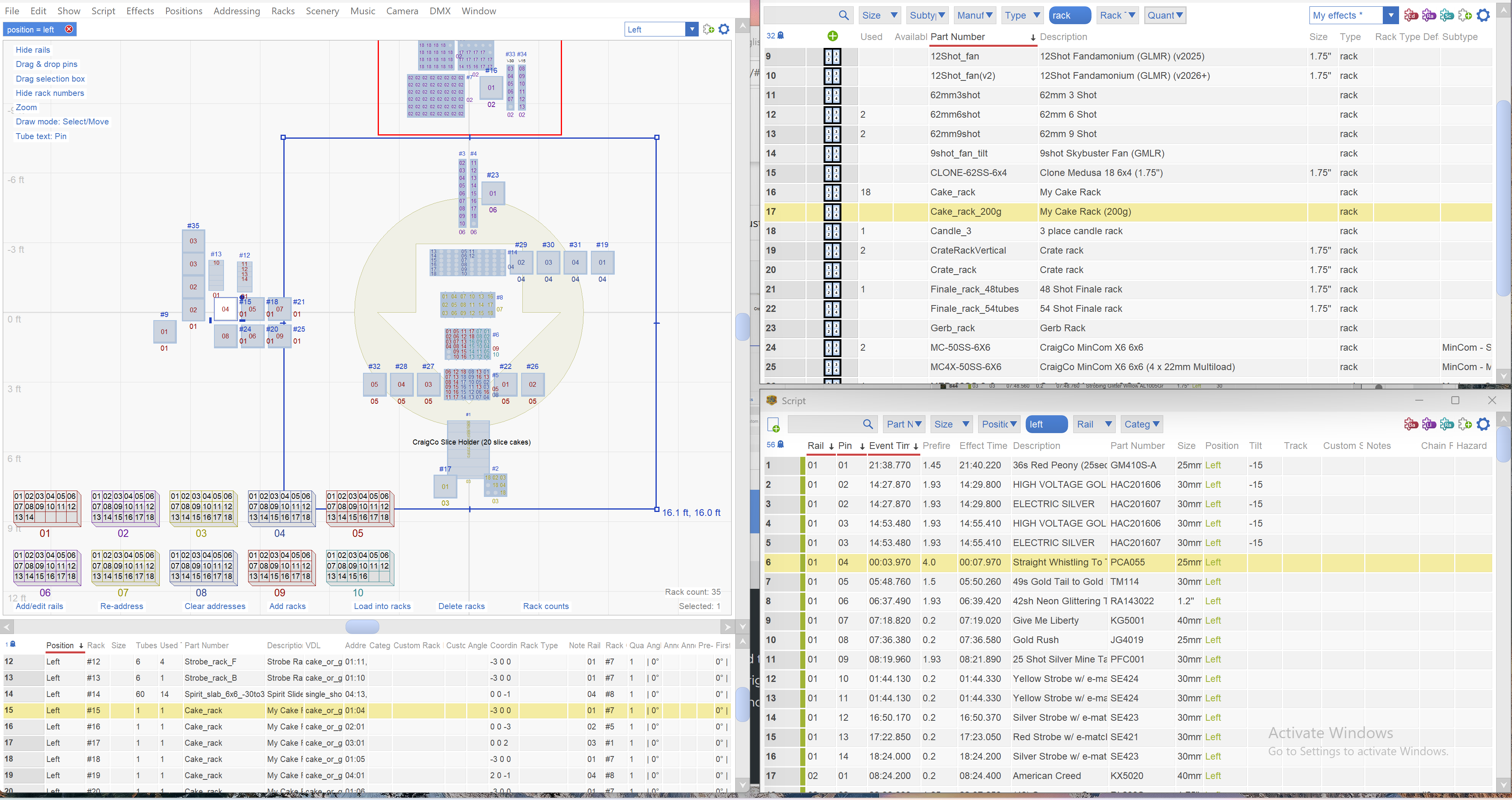
In the below pic, (hard to see), I’m trying to force the yellow highlighted cake in the script window (PCA055) that’s currently addressed to Rail01Pin04 into rack number 17, located on the bottom left corner of the craigco slice holder, currently addressed to Rail03Pin01.
There’s got to be a custom script, or custom rack or some sort of qualifier I can use that leaves my current sort and addressing intact, but re-orders my cakes so I can place them exactly into the rack clusters I need them to be in? You can’t see the rack clusters highlighted in these pics, but I grouped my racks and intentionally to match my module pin counts (Cobra uses 18pins per module). Then, lastly, I use my cakes to “backfill” open pins on modules to maximize pin usage and prevent “wasting” a module for a single or small number of cakes.
Thanks!
-Russ
RACKS VIEW:
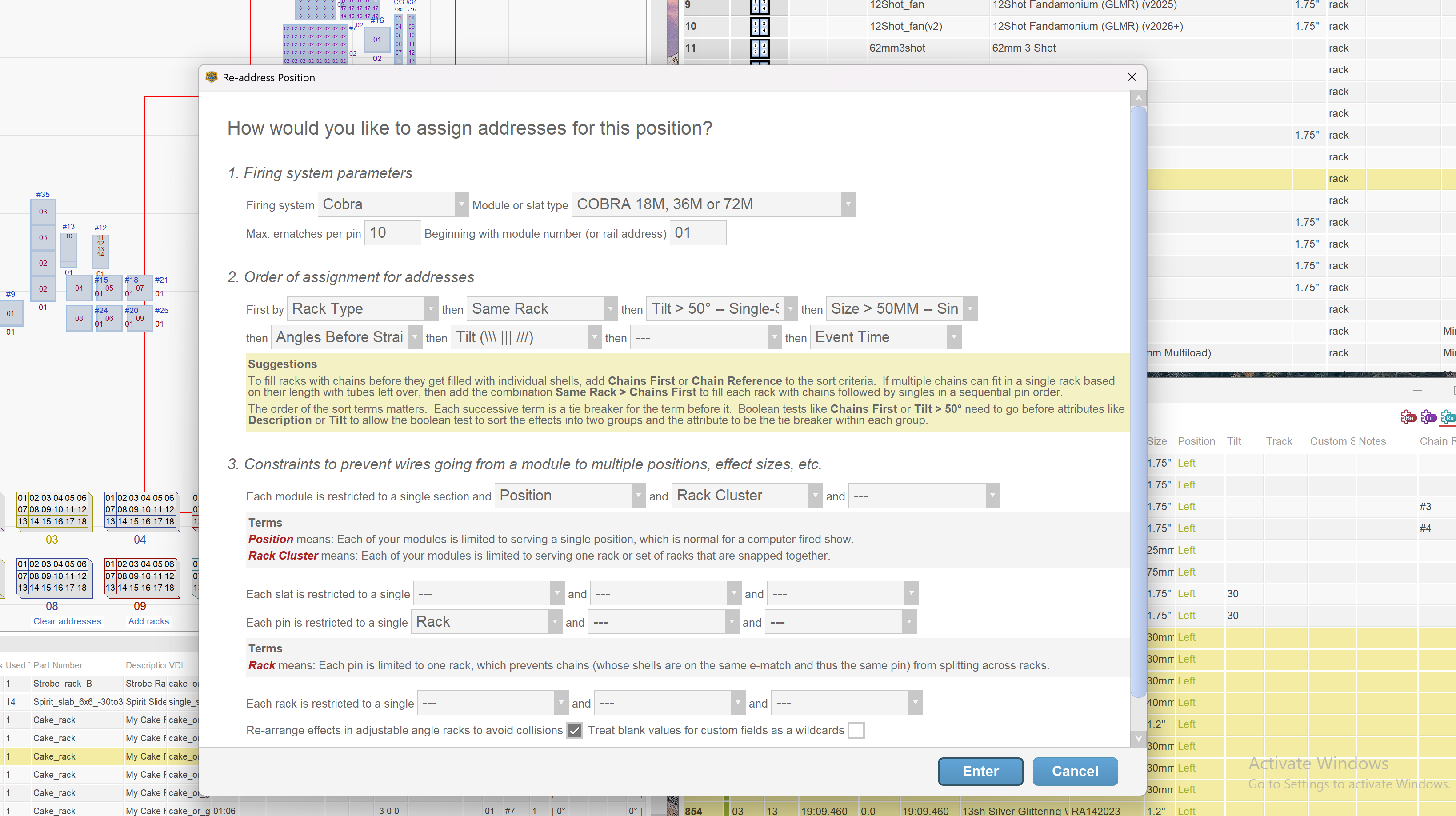
ADDRESS WINDOW: of note, this current (and probably, grossly inefficient and non-sensical) order of sorting qualifiers is what I used, with some creative “Rack Type” forcing functions to get the correct effects, into the correct racks, using the least amount of racks and modules in the process. This is the result. But it induced the above problem, and every time I moved the cakes around from one rack cluster to the next, then re-addressed, I did NOT get the result I wanted and cakes were addressing everywhere seemingly random. It most definitely has to do with my current sort order and the waterfall effects of the sorting logic. But i HAD TO leave the first six criteria exactly as they are.
AviatorRussJoined: Feb 2025 Posts: 17 Location: Cumberland, Maine United States NewcomerThe solution I found was a kinda simple, couple-step process, but by using a custom sorting qualifier, I was able to force the addressing function to do what I wanted.
Here’s a better screen shot. Again, the problem was I needed the effect highlighted (PCA055), [which is now in a different location at R04P01 (in red-circle 9-12)(because I removed the sort qualifier “Event Time” and I got a different result of where the cakes got placed around the map…as expected)], to be forced into red-circle 8 cake_rack.
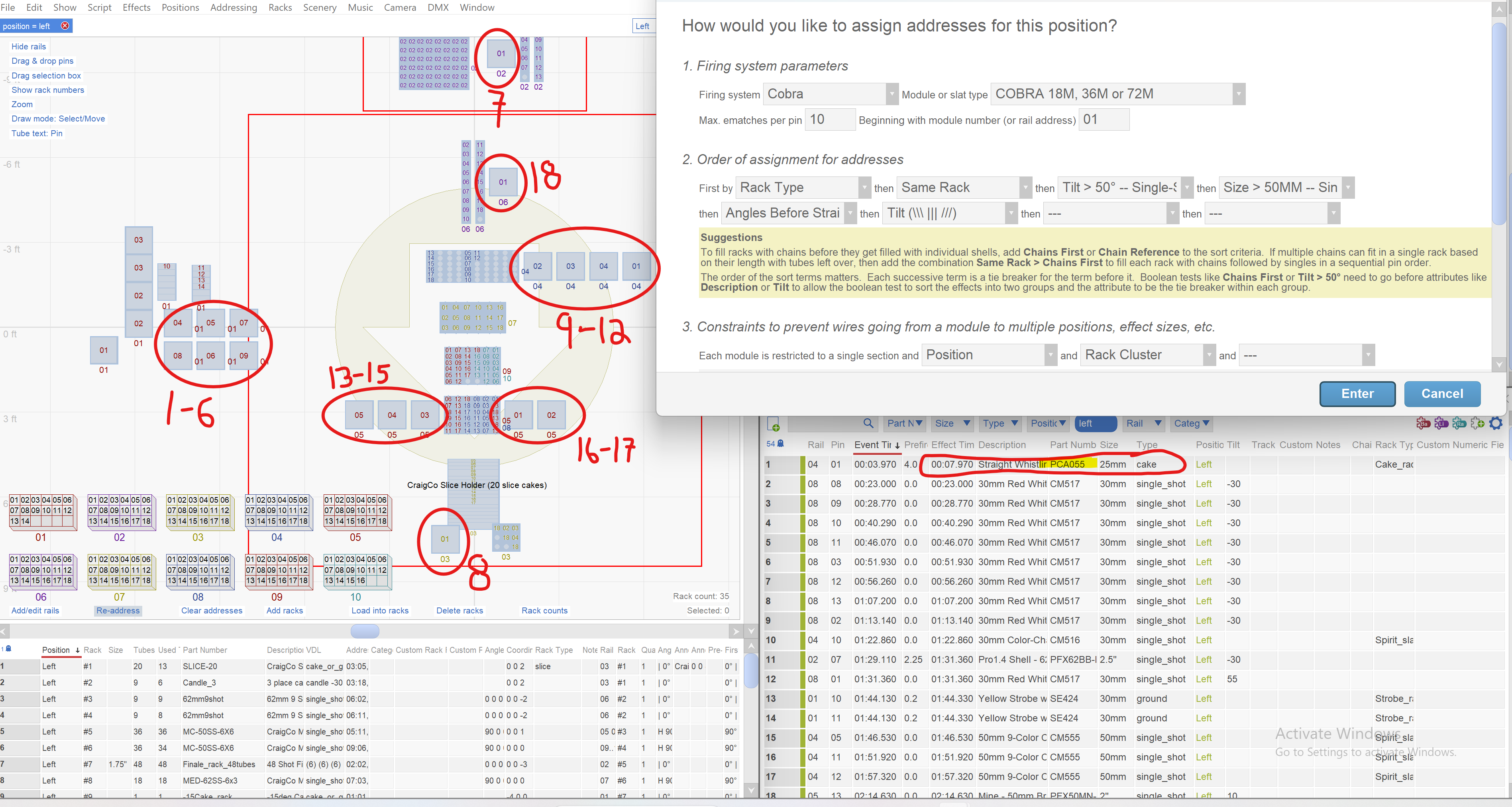
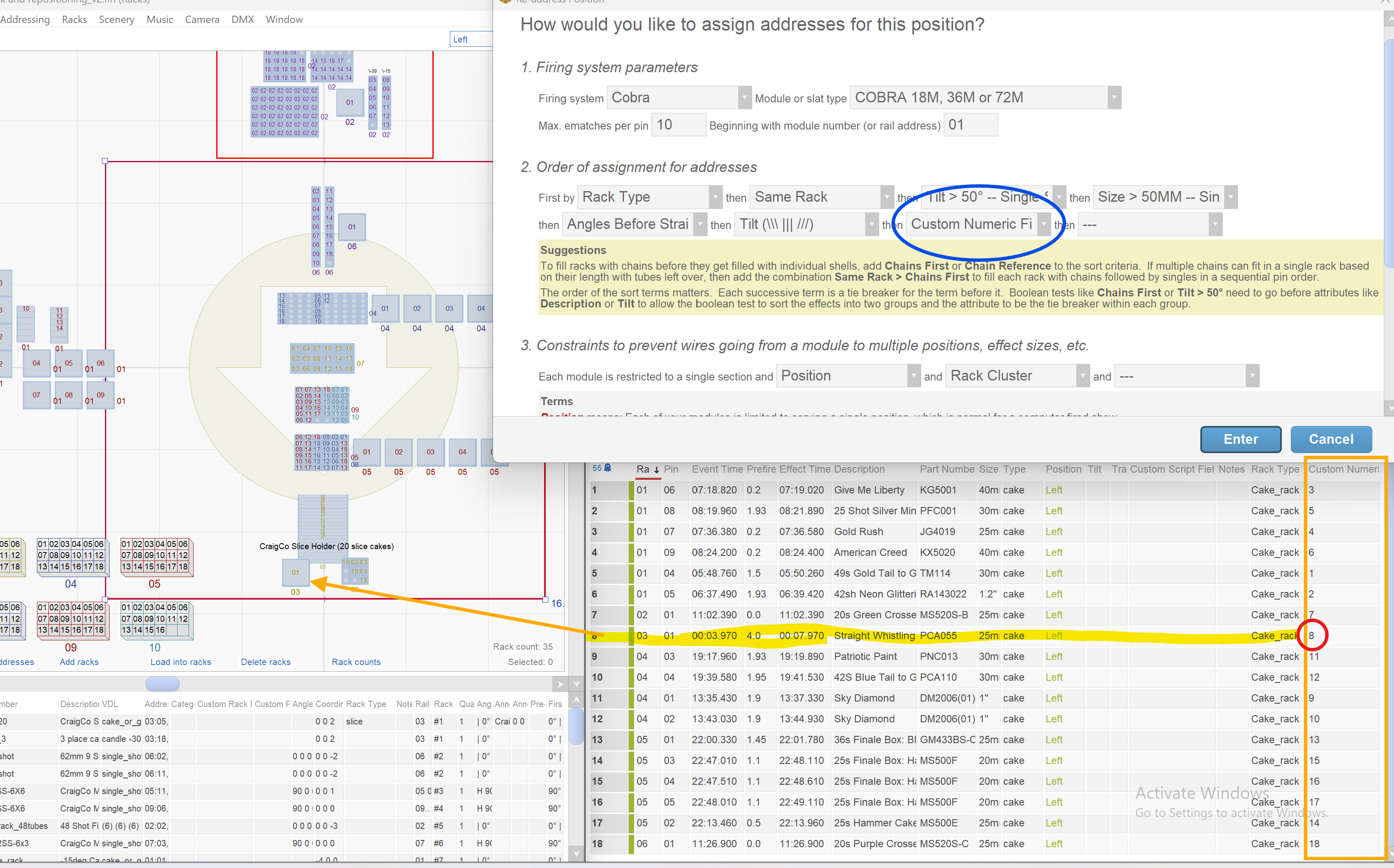
Here’s the process: First, I needed to know WHAT sort order the addressing was using without any additional qualifiers…which cakes are going into which racks. So I re-addressed using the blue circle below, which is essentially…my “default” sort order for this position now.
Then, in the script window, I filtered to Position:left & Type:cake. Problem…I have other “versions” of cakes in that position. I have angles cakes in angles cake racks, and slice cakes, which are all classified under the “cake” type.
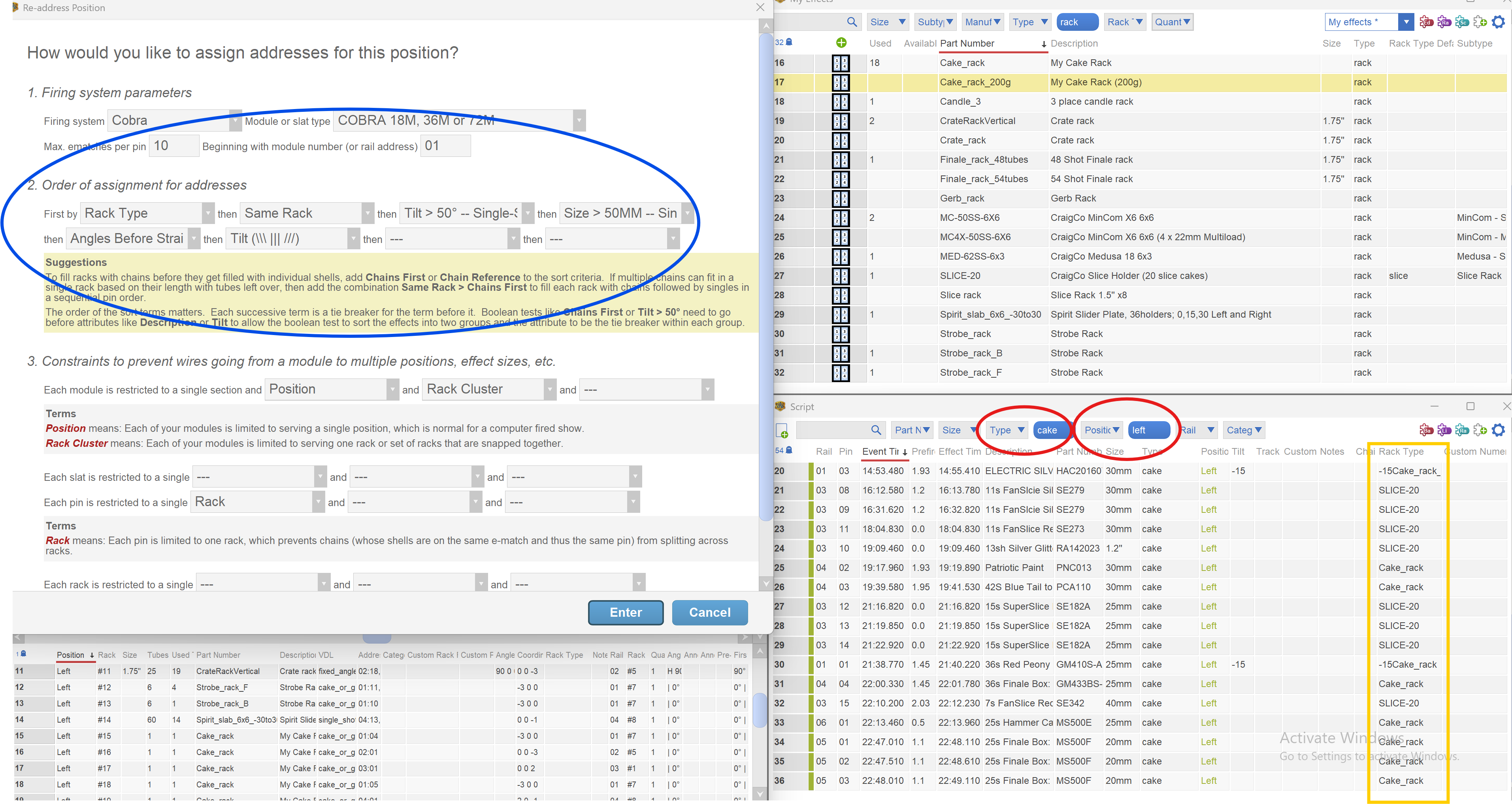
So one little trick you can use is to specify your own filter criteria with the ‘search’ window box. I input exactly Rack Type = cake_rack (it’s not case sensitive) and now I’ve isolated all my standalone, vertically launched, cakes…sorted by RAIL:PIN: . Now I know the default order the addressor is using to address these cakes, even though I don’t know WHY it’s chosen this sort order. WHY…doesn’t matter now… But I need a map telling me what effects are going into what cake_rack.
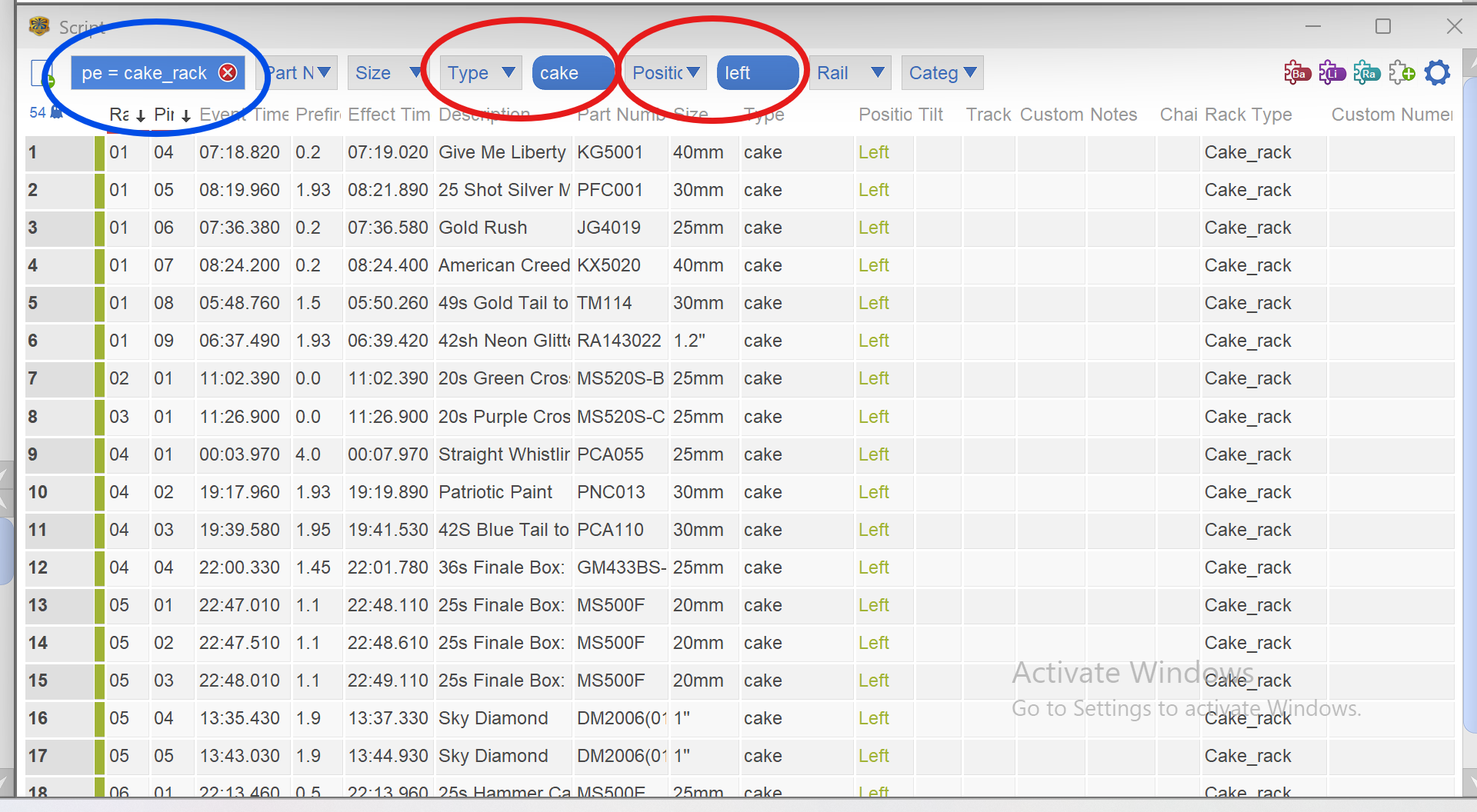
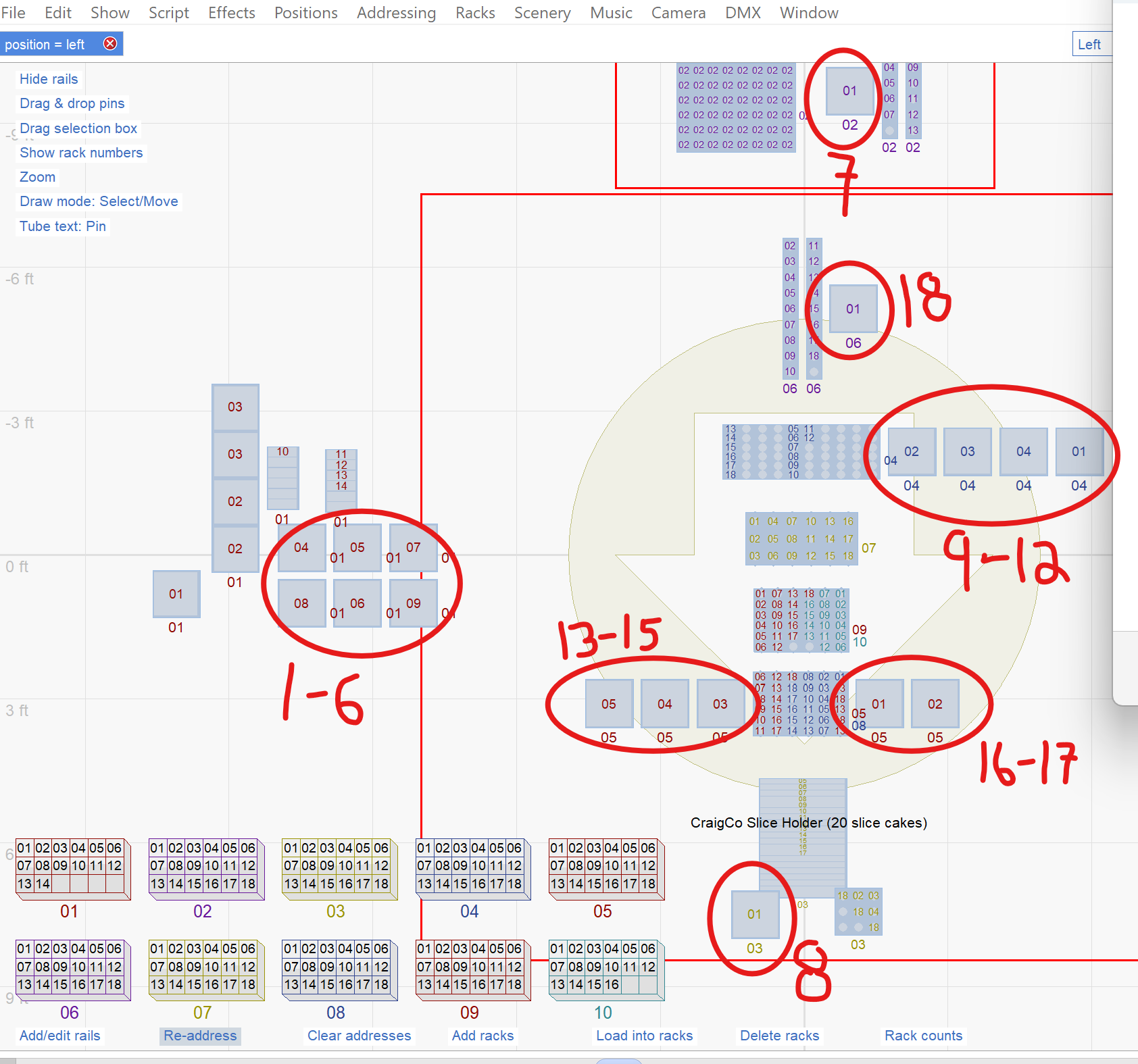
To draw my map, I correlated which effects were where by mousing-over the racks in the rack view, while looking at which lines in the script window were highlighted in red. What I discovered…the effects were defaulting into this loading order (don’t know why, and don’t care why at this point):
circle 1-6 loads first with the first 6 effects, then 7, 8, 9-12, 13-15, 16-17, then 18. This is my map of which racks are getting get which effects.
NOW, I have something to work with. I have the defaulted order of effects in the script window, as well as the defaulted order of the effect placements into cake racks. So now I need to alter the placement of the cakes WHERE I need them to go, using the addressors pre-determined default order.
I chose to use the ‘Custom Numeric Field’ to FORCE the order of how the effects get addressed. by not changing the location of the racks, the only thing this should change is which cakes gets picked first, second, third, etc to be placed into the default cake_racks sort order
So I drew out the sort sequence placement, which is my map…
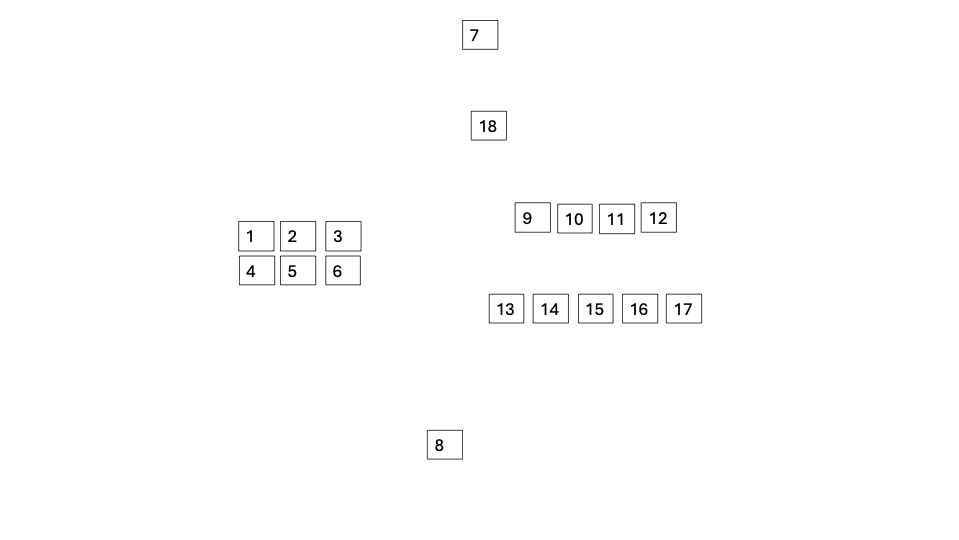
Using those numbers to define physical placement positions, I put those numbers in the effect’s ‘Custom Numeric Field’ to match the effect to a position. I re-addressed using ‘Custom Numeric Field’ as an ordering input and VOILA!!!!!!
I finally got what I wanted…EX: I wanted the PCA055 cake placed into the Cake_rack near the Craigco Slice Holder (arrow). That physical spot was determined by the addressor to be the 8th rack to receive a cake. Thus, by putting 8 in the Custom Numeric Field, I was able to direct the sorter to make this cake the 8th out of 18 to be placed…matching the sort ordering to specific cake_rake positions. NEAT!!
Now, I can lock my addressing and break apart my rack clusters and move my individual cakes around to fill the spaces, knowing they’ll be physically connected by e-match wires to a specific module (which in reality is a slat…) I’ll add labels to the rack diagram, print, and along with other printed documents (rack builds, effect loading, effect labels, etc etc) I have a position “package” document I can hand to my crew to facilitate site prep, loading, racking, and e-matching!!!
AviatorRussJoined: Feb 2025 Posts: 17 Location: Cumberland, Maine United States Newcomer….and…full disclosure…I AM NOT A RACKING/ADDRESSING GENIUS!
Someone will look at this and be like, hey, if you would have picked XYZA for your sort ordering, it would solved everything. AND, you’re probably right. I’m definitely a rookie with Racking and Addressing. I’m constrained by my on-hand numbers of modules, and racks, and I have to MAXIMIZE consuming all pins. I also use slats, so that everything is neatly pre-wired and then the only “wiring” that’s done on shoot day is to run the DB25 and cat5, and what’s left of the random cake ematching.
ALSO, I have a brand new APPRECIATION for the time it takes to answer questions and explain things in this forum! One simple question can take a lot of time to explain out with screenshots etc. Great job to the team that answers questions day in and out!
I hope this help someone, someday…
Cheers,
-Russ
AviatorRussJoined: Feb 2025 Posts: 17 Location: Cumberland, Maine United States Newcomerand last…to show how bad I am at racking…lol…I just stumbled upon the “Rack” column in the Script window. And…and…and…it looks like the EXACT thing i needed that would have saved me two days of struggling.
Someone please confirm for me, that you can type the rack# in the script window, and that will drive that specific effect into the specified rack# when racking/addressing?
I’m pretty sure it does. which fully answers the title of this thread. in one sentence…
 DrewFinale
Joined: Dec 2019 Posts: 803 Location: United States  Charcoal
Hi Russ, let me first say, I love how you worked through this challenge, found a solution, and I especially appreciate you sharing your insights for anyone interested in learning from it.
You said a few times that the order in which the addressing algorithm chose to address and load something seemed random. I’d just like to say for anyone reading this that the order will only be random if the sort criteria doesn’t fully dictate a specific addressing order. What do I mean by that? Here’s an example: suppose you have a comet, a cake, and a shell all with the same event time. Then suppose you addressed your show by event time. Since all the event times are the same, the addressing algorithm will provide an unpredictable solution. When there’s nothing to break a tie, the result will essentially be random.
Why did the addressing algorithm load XYZ item into this rack and not some other rack? The addressing algorithm walks through the script events in the order you choose, and as it assigns a rail and a pin to an event, it looks for a compatible rack. If there are multiple compatible racks, it loads the item into the compatible rack with the lowest rack number.
There are two columns in the script that link the events/effects to racks. The columns are Rack and Tube. Even if the rack is a cake rack, the Rack and Tube columns in the script are still both used to link the cake effect to the rack. Yes, you can type in the Rack and Tube columns in the script to assign an event/effect to a rack. But, in the Pro version of Finale 3D, the addressing algorithm populates those columns, so if you don’t lock the address for that line of script, any values entered will be wiped and overwritten the next time the show is addressed.
Final note, the Racks window has a drag-and-drop feature that allows you to drag items from the ground, from a module, or from rack to rack. If you want a particular effect in a particular rack, you can just drag it into that rack.
-
AuthorPosts
Please login to reply to this topic.