
Racking and adressing show

-
AuthorPosts
-
 pyro31028707
Joined: Apr 2025 Posts: 1 Location: Prague, Prague, Czechia  Newcomer
Hi, I have Finale hobbyist.
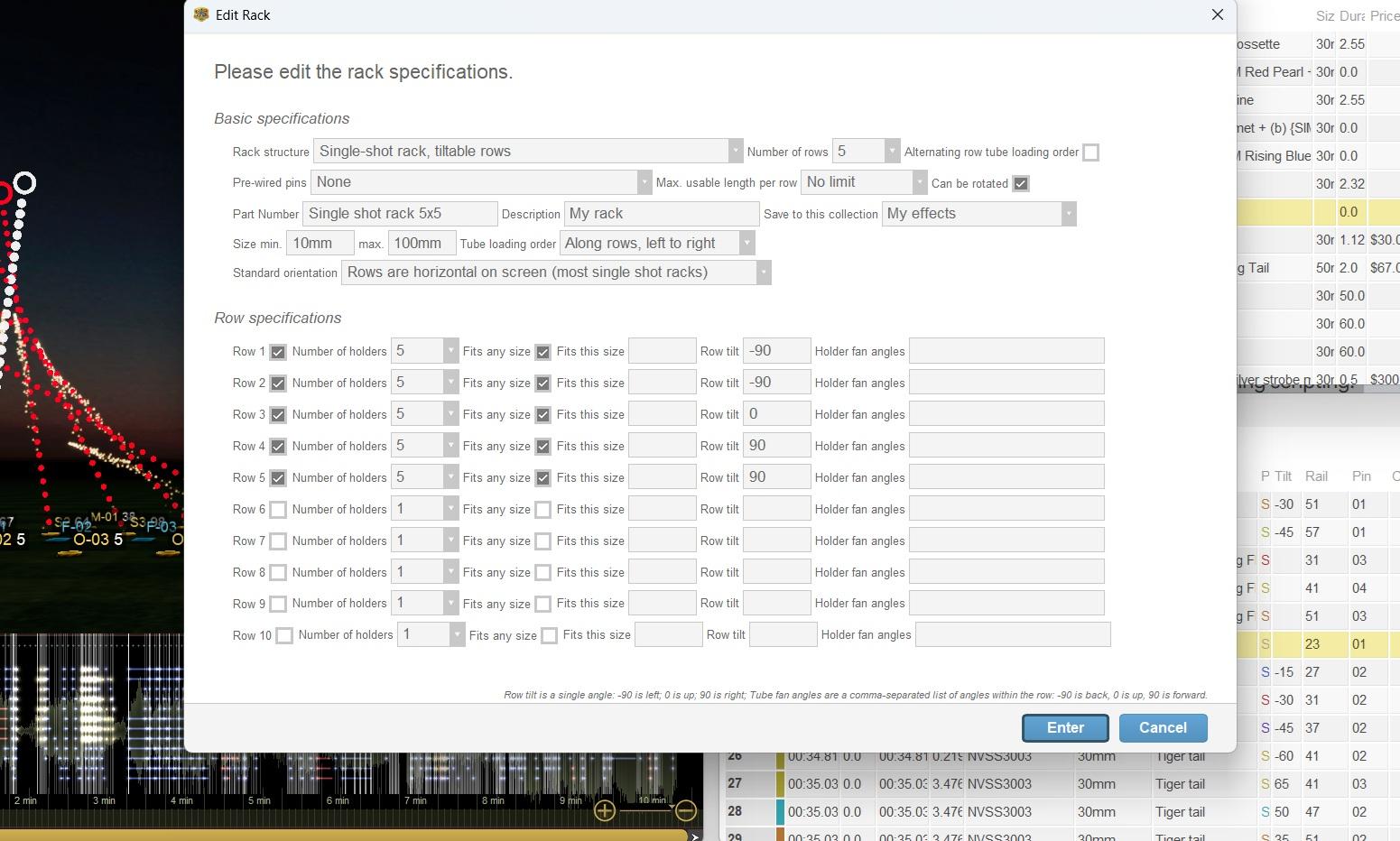
Is it possible for Finale to distribute single shots in to racks? I am using a 5×5 rack configuration, with each row angled as required. I’ve attached a screenshot to show if I’ve set up the rack correctly. I need Finale to sort the single shots into the racks based on their angles and to account for my Cobra 18-cue modules during scripting. What are the best settings to use for addressing?Thank you very much.
 DrewFinale
Joined: Dec 2019 Posts: 803 Location: United States  Charcoal
Hi Pyro31028707, Welcome to the Finale 3D community and thanks for posting!
I see a couple issues with your rack configuration.
First, if your rack has tiltable rows for creating left/right angles, set the standard orientation option to “Rows are vertical on screen”. If the orientation is set to “horizontal”, as you have it now, the tilt direction will be toward and away from the audience, which is most likely not what you want.
Second, if the angle of each row in your rack is adjustable, leave the row tilt fields blank. Row tilt can’t be used to specify an angle range; it only specifies a specific angle for the row. For example, you currently have row 1 set to -90. This means that the first row in the rack is permanently fixed at -90 degrees and can not be adjusted, which I don’t think matches how your rack actually works.
The Hobbyist version of Finale 3D allows you to create racks matching your real-world equipment, and calculate the number of those racks needed based on the show design. The calculation uses the quantity, type, and angles of effects in each position. That’s as far as the Hobbyist version goes. It does not distribute, load, or assign each specific single shot into a rack.
By contrast, the Pro version of Finale 3D loads each effect into a rack during the addressing process. This means that as each effect receives a rail and pin number (module and cue in Cobra terminology), it also receives a rack assignment. This functionality allows the addressing process to take the racks into consideration. For example, it can create a one-to-one relationship between a module and a single-shot rack. The Hobbyist version doesn’t have this same capability because the addressing process does not incorporate racks.
A common workaround in Hobbyist is to create a separate position for each single shot rack. This gives you better control over how the effects will be wired to the modules. It works well for smaller shows but can be inefficient for larger shows due to the number of positions required to represent all the racks.
-
AuthorPosts
Please login to reply to this topic.