
Windows 11 “Bad Image” error when launching Finale 3D

-
AuthorPosts
-
 DrewFinale
Joined: Dec 2019 Posts: 812 Location: United States  Charcoal
We’ve recently started seeing an issue on a handful of Windows 11 computers where Finale 3D had been working normally and then suddenly will no longer launch.
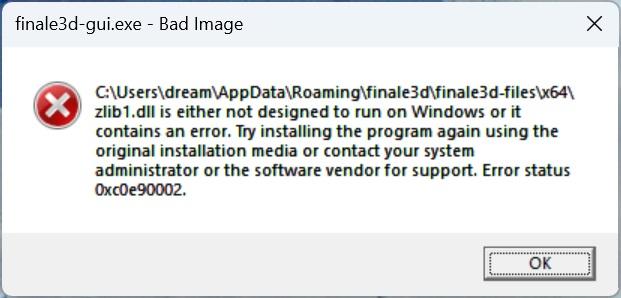
The error appears as a “Bad Image” message referring to a DLL file in the Finale 3D installation directory, with an error status such as 0xc0e90002. The DLL named in the message may vary. Here’s an example of the error:
We’ve determined that, in the cases we’ve investigated so far, there is nothing wrong with the Finale 3D installation files and no need to reinstall Finale 3D. Instead, the error is caused by Windows Smart App Control blocking one or more of the DLL files used by Finale 3D.
For now, the workaround is to disable Smart App Control:
- Click the Start button and type Windows Security, then open it.
- Click App & browser control.
- Under Smart App Control, click Smart App Control settings.
- Select Off.
- If a User Account Control prompt appears, click Yes to confirm.
After disabling Smart App Control, try launching Finale 3D again.
Disabling a Windows security feature is not an ideal long-term solution, but this should get Finale 3D running again. We are investigating whether there is something we can change on our side so Finale 3D will work properly with Smart App Control enabled.
If you encounter this problem and disabling Smart App Control does not resolve it, please contact Finale 3D Support at support@finale3d.com.
-
AuthorPosts
Please login to reply to this topic.