
MP3 audio issues (static, crackling, popping, clicking) when importing songs into Finale 3D
Home › English › MP3 audio issues (static, crackling, popping, clicking) when importing songs into Finale 3D

-
AuthorPosts
-
 DrewFinale
Joined: Dec 2019 Posts: 735 Location: United States  Silver
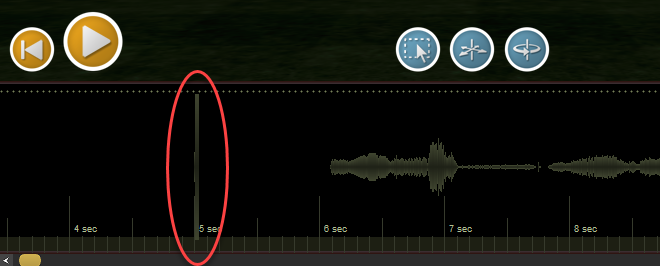
We’ve gotten reports of audio playback artifacts in Finale 3D, such as popping, clicking, or static. Below is a screenshot showing how the issue appears on the Finale 3D timeline. We know that the problem is specific to MP3 files. We aren’t sure why some MP3 files work perfectly, and others cause this issue. Bottom line, we plan to improve how MP3 audio files are handled as soon as we can.
In the meantime, there is a good workaround that resolves the issue 100% of the time. All you have to do is use an audio editor, such as Audacity, to encode your music as a WAV file instead of an MP3. You can then import the WAV file into Finale 3D. Or, if you prefer to design your show using an MP3, for example because you are planning to use with the Cobra Audio Box, you can convert your soundtrack to WAV and then back to MP3. Here are the steps:
- Using Audacity (or another audio editor), export your soundtrack as a WAV file with a sample rate of 44,100 Hz and 16-bit encoding.
- Import your WAV soundtrack into Finale 3D and design your show.
Additional steps for the Cobra Audio Box
- After following steps 1 & 2, restart Audacity or go to File > New to start a new project.
- In the new Audacity project, go to File > Import > Audio and import the WAV file created in step 1 above.
- Go to File > Export Audio and create an MP3 file with a sample rate of 44,100 Hz, bit rate mode of Constant, and quality of 320 kbps.
- Import your MP3 soundtrack into Finale 3D and design your show.
- Load the MP3 you created in step 5 into the Cobra Audio Box to fire your show.
 Walker Pyrotechnics
Joined: Dec 2021 Posts: 37 Location: Vicksburg, MI  CharcoalDrewFinale
Joined: Dec 2019 Posts: 735 Location: United States SilverHi PyroWalker, I’m sorry, I hear your frustration, we’ll get this fixed as soon as we can. Unfortunately, it’s not a quick task, we estimate we need to allocate a full week of development time troubleshoot and resolve the issue. In the meantime, you can still you MP3s in Finale 3D, not just WAV files. You just need to convert your soundtrack to WAV and then back to MP3. Here’s a tutorial that demonstrates the process:
 Curtis B
Joined: Jan 2023 Posts: 49 Location: 1808 E St Louis St, Springfield, MO 65802, USA  Newcomer
Has there been any new development on this? I just tried importing an MP3 and it is still getting the “blip”.
Hi PyroWalker, I’m sorry, I hear your frustration, we’ll get this fixed as soon as we can. Unfortunately, it’s not a quick task, we estimate we need to allocate a full week of development time troubleshoot and resolve the issue. In the meantime, you can still you MP3s in Finale 3D, not just WAV files. You just need to convert your soundtrack to WAV and then back to MP3. Here’s a tutorial that demonstrates the process: <iframe class=”wp-embedded-content” title=”Fixing MP3 audio artifacts” src=”https://www.loom.com/embed/a3c30e578310494a9176c9564a02db20#?secret=nuiHeaVyYY” width=”1140″ height=”855″ frameborder=”0″ allowfullscreen=”true”></iframe>
DrewFinaleJoined: Dec 2019 Posts: 735 Location: United States SilverHey Curtis B, sorry, not yet. We’ve been prioritizing other bug fixes since this bug has an easy workaround that’s 100% reliable.
 PyroDan
Joined: Mar 2025 Posts: 1 Location: Columbia mo NewcomerDid anyone ever figure out how to fix this (outside of using audacity).
I had same issue on mp3 file which had the click in F3D, but not on file. Wav would not upload into f3d at all.
Changed bit depth from 24 to 16 and it seemed to solve the problem for me when exporting mp3 a second time.
DrewFinaleJoined: Dec 2019 Posts: 735 Location: United States SilverHey PyroDan, the MP3 audio artifact issue is a bug in the way Finale 3D currently handles MP3 files. We will fix it eventually, but we haven’t prioritized it because WAV is uncompressed (highest quality) and works 100% of the time if it is formatted properly. Finale 3D supports WAV files with a sample rate of 44,100 Hz (44.1 kHz) and bit depth of 16-bit. If you format your WAV files with these specs., it should work perfectly in Finale 3D every time.
 Jonathan S.
Joined: Mar 2021 Posts: 13 Location: Alberta, Canada NewcomerTheNecromancer13Joined: Mar 2024 Posts: 7 Location: Great Cacapon, WV, USA NewcomerWell, the issue persists, and I just tried to do the .mp3 to .wav back to .mp3 and the glitch was still there. I then tried to import the .wav instead and it failed to import the audio, just a blank track so I guess I’m stuck with the glitch for this show. It’s really frustrating that such an expensive and unique piece of software has a bug this common that has not been fixed for years.
DrewFinaleJoined: Dec 2019 Posts: 735 Location: United States SilverWell, the issue persists, and I just tried to do the .mp3 to .wav back to .mp3 and the glitch was still there. I then tried to import the .wav instead and it failed to import the audio, just a blank track so I guess I’m stuck with the glitch for this show. It’s really frustrating that such an expensive and unique piece of software has a bug this common that has not been fixed for years.
Hi TheNecromancer13, I completely understand your frustration. You are absolutely NOT stuck with the glitch for your upcoming show — we’re here to help. If you’re not seeing the waveform on the Finale 3D timeline after importing a WAV file, it’s because your WAV file has an incompatible sample rate or bit depth. Make sure your WAV file has a sample rate of 44,100 Hz (44.1 kHz) and a bit depth of 16-bit. Alternatively, you simply send your soundtrack to support@finale3d.com and we’ll fix it up for you and send it right back.
-
AuthorPosts

Please login to reply to this topic.