
The DMX Parameters and Intensity columns — example for pyro intros (hobby+pro)

-
AuthorPosts
-
 Will
WillJoined: Feb 2018 Posts: 65 Location: Palo Alto  Newcomer
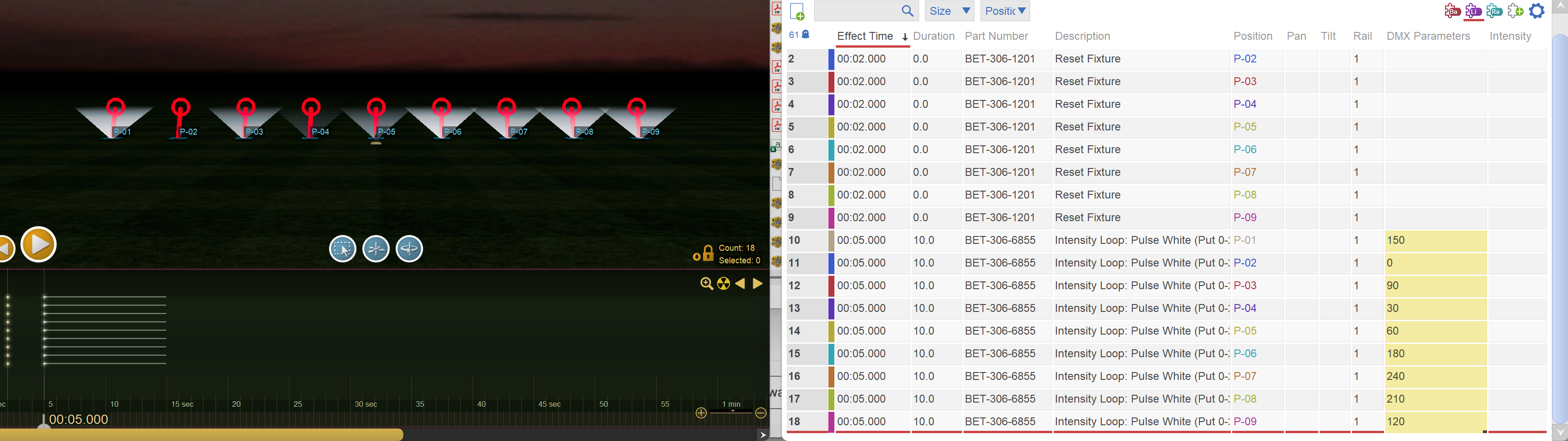
In the flurry to get the latest releases out, which hit simultaneously with PyroJam, PTC, and Elevate, our documentation and communication about what the releases actually contain has been lacking. There are two new columns in the script window, DMX Parameters and Intensity, which create variations of individual effects in the script. Why care? Because with these per-event changes you can make cool scenes and you don’t have to create custom effects to do it. Here’s an example for a row of par lights that looks awesome at the beginning of a show:
0. Right click on positions and “Configure as fixture” from the menu. Choose your fixture. Click yes to add or update the “standard effects” for your fixture, which includes some animation effects like “Intensity Loop”.
1. Insert the “Intensity Loop: Pulse” in all your positions.
2. In the DMX Parameters column in the script window, type 0 in the cell for the first position’s effect. Type 30 in the cell for the second.
3. Click on the first cell (containing 0) and drag down such that the first two cells containing 0 and 30 (just cells, not rows) are selected. Now in the lower right corner of that yellow selection box will be a black dot. Click the black dot and drag down to extend the sequence to all the rows: 0, 30, 60, 90, … (In Excel this is called the “fill handle”.)
4. Leaving the cells selected, right click on one, and from the context menu select “Randomize”. That will result in something similar to what you see in the image above. This context menu is a new feature we just added.
5. That’s it.
Here’s what’s happening. When you put numbers in the DMX Parameters column, the numbers get piped into to the “phase” parameter of animated effects, which means an offset into the animation. The numbers are in degrees, 0-360. This example is starting the pulsing animation with different phases randomized, which looks cool.
If you try this same technique with the motion loop “standard effects” for moving head lights you get very impressive results.
These animations smoothly change the intensity or angle, so if your firing system doesn’t have the ramp capability (e.g., Cobra prior to V8.0 which was just released two days ago), then the animations generate quite a few rows of script. The ramp capability reduces the number of generated lines quite a lot, and makes the animation smoother.
The Intensity column scales the intensity of the effect. 0 = off; 255 = full intensity.
-
AuthorPosts
Please login to reply to this topic.