-
Lite
-
Hobbyist
-
Pro
-
Real-time visual simulation
-

-
-
-
+
Unlimited effects
-
-
-
My effects
-
-
-
Supplier catalogs
List of all supplier catalogs →-
-
-
Create/edit effects by typing Visual Descriptive Language (VDL)
-
-
-
Create custom simulations
-
-
-
Create wheels, girandolas, line rockets, and lance set pieces
-

-
-
Automatically write VDL to create a cake from a selection of single shot effects
-
-
-
Break apart cakes
-
-
-
Automatically write VDL to create a chain from a selection of shell effects
-
Create chains manually by typing VDL
-
-
-
Unlimited positions
-
-
-
-
Unlimited cues
-
-
-
-
+
Inventory management
-
LIMITED
Manual inventory management
-
-
Manual inventory management
-
-
-
Import effects and inventory quantities from a spreadsheet, Microsoft Access database, or Show Director EFX file.
-
-
-
Finale Inventory integration
-
-
Requires Finale Inventory subscription
-
Requires Finale Inventory subscription
Offline effect databases
-
-
-
Shared company effects list
-
-
-
Requires 2 users
Import effects from Finale Business HBS files
-
-
-
Import Quotas
-
-
-
-
+
Every major firing system
-
LIMITED
Pyro only, no DMX
-
Pyro and DMX
-
Pyro and DMX
ActionBase
View documentation →-
-
-
Apex
View documentation →-
-
-
Cobra
View documentation →-
LIMITED
Pyro only, no DMX
-
Pyro and DMX
-
Pyro and DMX
Crackle Cube
-
-
-
Dance of Fire
View documentation →-
-
-
Explo
View documentation →-
-
-
Fire Control G2
View documentation →-
LIMITED
Pyro only, no DMX
-
Pyro and DMX
-
Pyro and DMX
Fire Pioneer
View documentation →-
-
-
FireByWire
View documentation →-
-
-
FireCTRL
-
-
-
FirelinxLT
View documentation →-
-
-
Firemaster
View documentation →-
-
-
FireOne
View documentation (FIR & SEM) →
View documentation (FireOne CSV) →-
LIMITED
Pyro only, no DMX
-
Pyro and DMX
-
Pyro and DMX
fireTEK
View documentation →-
LIMITED
Pyro only, no DMX
-
Pyro and DMX
-
Pyro and DMX
Galaxis
View documentation →-
-
-
Happiness DBW03
View documentation →-
-
-
IGNITE
View documentation →-
-
-
Jingduan
View documentation →-
-
-
MainFX
View documentation →-
-
-
Megafire
View documentation →-
-
-
Merlin
View documentation →-
-
-
Mongoose
View documentation →-
LIMITED
Pyro only, no DMX
-
Pyro and DMX
-
Pyro and DMX
Piroshow
View documentation →-
LIMITED
Pyro only, no DMX
-
Pyro and DMX
-
Pyro and DMX
Pirotex
View documentation →-
-
-
PryoDigiT
View documentation →-
-
-
Pryodigy
View documentation →-
LIMITED
Pyro only, no DMX
-
Pyro and DMX
-
Pyro and DMX
Pyrodigital
View documentation →-
LIMITED
Export only, no panel download
-
Export or download to panel
-
Export or Download to panel
Pyroleda
View documentation →-
-
-
Pyromac
View documentation →-
LIMITED
Pyro only, no DMX
-
Pyro and DMX
-
Pyro and DMX
PyroMaster
View documentation →-
-
-
Pyromate
View documentation →-
LIMITED
Export only, no panel download
-
Export or Download to panel
-
Export or Download to panel
Pyroneo
View documentation →-
-
-
Pyroseeking
-
-
-
PyroSoftware
-
-
-
PyroSure
View documentation →-
LIMITED
Pyro only, no DMX
-
Pyro and DMX
-
Pyro and DMX
Pyrotronix
View documentation →-
LIMITED
Pyro only, no DMX
-
Pyro and DMX
-
Pyro and DMX
RFRemotech
View documentation →-
-
-
RJ Equipamentos
View documentation →-
-
-
SBC Spectra Series
View documentation →-
-
-
SBC TX3600P
View documentation →-
-
-
ShangYi-TECH
View documentation →-
-
-
Showven FXcommander
View documentation →-
LIMITED
Pyro only, no DMX
-
Pyro and DMX
-
Pyro and DMX
Showven PyroMote
View documentation →-
LIMITED
Pyro only, no DMX
-
Pyro and DMX
-
Pyro and DMX
StarFire
View documentation →-
-
-
Generic CSV
View documentation →-
-
-
Pin Board
View documentation →-
-
-
-
DMX show design
Supported DMX fixtures → -
-
-
-
Custom DMX effects
-
-
-
-
Drone show visualization
-
-
-
-
+
Racks
-
-
-
Add racks for show
-
-
-
Add racks individually
-
-
-
Add racks for selected events
-
-
-
Delete all racks
-
-
-
Delete and re-add racks for show
-
-
-
Create rack
-
-
-
Edit rack
-
-
-
Select events missing rack assignments
-
-
-
Clear rack assignments of selected events
-
-
-
Clear all rack assignments
-
-
-
Renumber all racks consecutively
-
-
-
Load effects with firing system addresses into racks
-
-
-
Re-load selected effects from script into racks
-
-
-
Rack counts
-
-
-
-
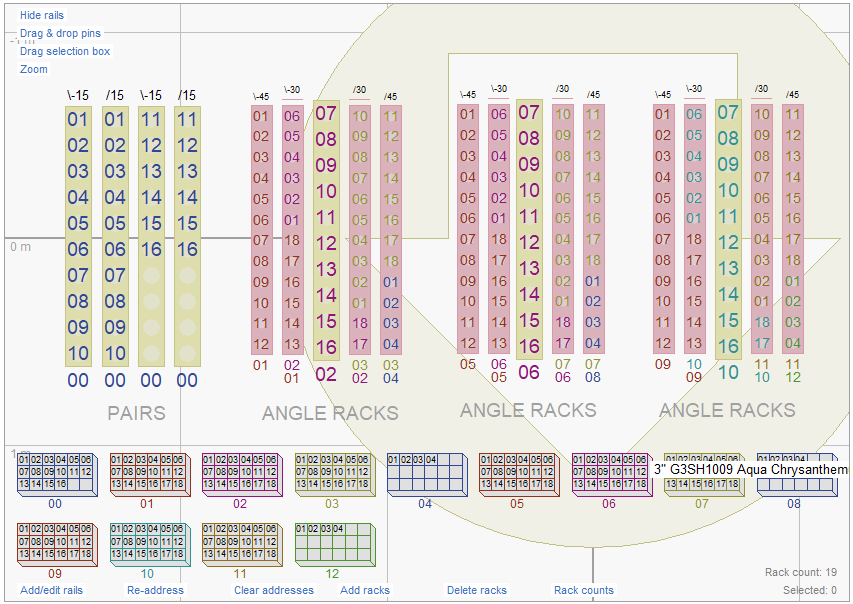
Graphical rack layout (drag & drop racks)
Screenshot → -
-
-
-
Rack diagrams (PDF)
-
-
-
-
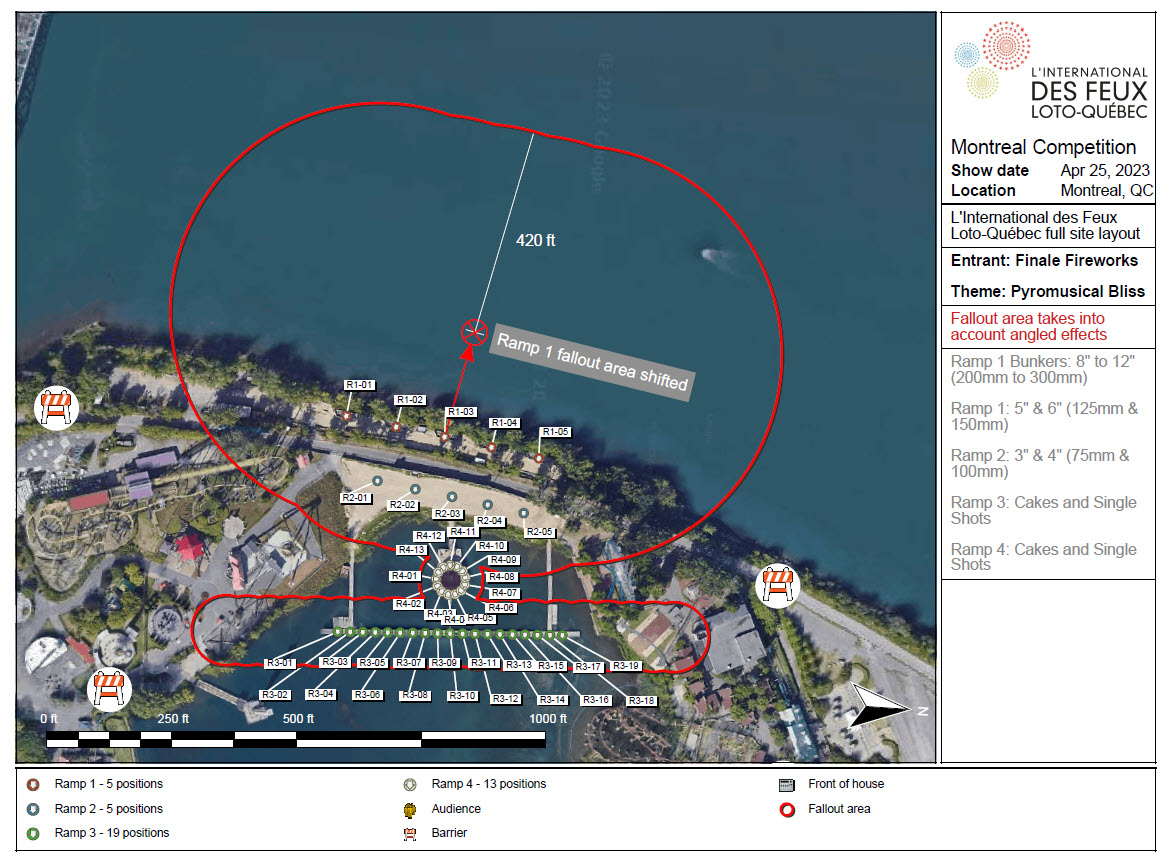
Site layouts (PDF)
Screenshot → -
-
-
-
+
Reports
-
LIMITED
5 basic report templates. PDF only
-
33 comprehensive report templates. PDF, XLSX, TXT, CSV
-
33 comprehensive report templates. PDF, XLSX, TXT, CSV
Pinboard Cue Sheet
-
-
-
Product List by Position
-
-
-
Product Totals
-
-
-
Pull Sheet
-
-
-
Wiring Script
-
-
-
Chain Specifications
-
-
-
Rack List
-
-
-
Rack Setup
-
-
-
Rack Totals
-
-
-
Safety Distance
-
-
-
Size Totals
-
-
-
Spotter Script
-
-
-
Angle Counts Per Module
-
-
-
Angle Counts Per Position
-
-
-
Angle Counts Per Rack
-
-
-
DMX Fixture Setup
-
-
-
Effect Collection Product Report
-
-
-
Modules Per Position
-
-
-
Product List By Position
-
-
-
Product List By Storage Location
-
-
-
Product List By Storage Location With Addresses
-
-
-
Product List By Storage Location With Positions
-
-
-
Product Summary Per Position
-
-
-
Rack List By Rack Cluster
-
-
-
Rack List By Rack Type
-
-
-
Setup By Module
-
-
-
Setup By Part Number
-
-
-
Setup By Position
-
-
-
Setup By Position (Finale Business Format)
-
-
-
Single-Shot Setup By Module With Pan Tilt Angles
-
-
-
Single-Shot Setup By Module With Pitch Roll Angles
-
-
-
Single-Shot Setup By Rack With Pan Tilt Angles
-
-
-
Single-Shot Setup By Rack With Pitch Roll Angles
-
-
-
-
+
Labels
-
LIMITED
15 label templates
-
45 label templates standard labels + chain and rack labels
-
45 label templates standard labels + chain and rack labels
Austab CL33 A4 25.4mm x 70mm
-
LIMITED
sorted by part number only
-
sorted by part number, address, position, or size
-
sorted by part number, address, position, or size
Avery 5163 2in x 4in
-
LIMITED
sorted by part number only
-
sorted by part number, address, position, or size
-
sorted by part number, address, position, or size
Avery 5195 2/3in x 1-3/4 in
-
LIMITED
sorted by part number only
-
sorted by part number, address, position, or size
-
sorted by part number, address, position, or size
Avery 5260 lin x 2-5/8in
-
LIMITED
sorted by part number only
-
sorted by part number, address, position, or size
-
sorted by part number, address, position, or size
Avery 52671/2in x 1-3/4in
-
LIMITED
sorted by part number only
-
sorted by part number, address, position, or size
-
sorted by part number, address, position, or size
Avery DPS30-100 A4 29.7mm x 70mm
-
LIMITED
sorted by part number only
-
sorted by part number, address, position, or size
-
sorted by part number, address, position, or size
Avery L4737 A4 29.6mm x 63.5mm
-
LIMITED
sorted by part number only
-
sorted by part number, address, position, or size
-
sorted by part number, address, position, or size
Avery L7158 A4 26.7mm x64mm
-
LIMITED
sorted by part number only
-
sorted by part number, address, position, or size
-
sorted by part number, address, position, or size
Avery L7160 A4 38.1mm x 63.5mm
-
LIMITED
sorted by part number only
-
sorted by part number, address, position, or size
-
sorted by part number, address, position, or size
Dymo 30252 roll l-l/8in x 3-l/2in
-
LIMITED
sorted by part number only
-
sorted by part number, address, position, or size
-
sorted by part number, address, position, or size
Dymo 30252 roll rotated l-l/8in x3-l/2in
-
LIMITED
sorted by part number only
-
sorted by part number, address, position, or size
-
sorted by part number, address, position, or size
Dymo 30336 roll lin x 2-l/8in
-
LIMITED
sorted by part number only
-
sorted by part number, address, position, or size
-
sorted by part number, address, position, or size
Dymo 30336 roll rotated lin x2-l/8in
-
LIMITED
sorted by part number only
-
sorted by part number, address, position, or size
-
sorted by part number, address, position, or size
Label Planet LP33/53 A4 22mm x 54mm
-
LIMITED
sorted by part number only
-
sorted by part number, address, position, or size
-
sorted by part number, address, position, or size
Label Power LP33 A4 25.4mm x 70mm
-
LIMITED
sorted by part number only
-
sorted by part number, address, position, or size
-
sorted by part number, address, position, or size
-
Custom reports and labels
-
-
-
-
Music & soundtracks
-
LIMITED
One audio track per show, import a multi-song soundtrack created outside Finale 3D
-
Unlimited audio tracks per show, import individual songs and edit soundtracks directly in Finale 3D
-
Unlimited audio tracks per show, import individual songs and edit soundtracks directly in Finale 3D
-
+
Timecode
-
-
LIMITED
-
Add SMPTE timecode to soundtrack
-
-
-
Add FSK timecode to soundtrack
-
-
-
Mute left or right audio channel during playback
-
-
-
Sync timeline to external timecode input
-
-
-
Align songs on the timeline based on their timecode
-
-
-
Analyze audio file and provide timecode statistics
-
-
-
-
3D models (SKP & GLB)
-
-
-
-
+
Background images & scenery
-
LIMITED
2D backdrop images
-
2D backdrops, sky dome & ground images, reflective water and terrain
-
2D backdrops, sky dome & ground images, reflective water and terrain
Add a 2D backdrop image
-
-
-
Darken images to transform daylight into night
-
-
-
Add custom sky dome image
-
-
-
Add custom ground image
-
-
-
Add reflective water
-
-
-
Draw gentle hills
-
-
-
Draw steep hills
-
-
-
Draw giant mountains
-
-
-
Carve valleys in hills
-
-
-
Flatten hilly area into plateau
-
-
-
-
MP4 video export
-
-
LIMITED
720p Maximum, personal (non-commercial) use only
-
4k Maximum, unrestricted personal and commercial use
-
Long exposure photos
-
LIMITED
Photos from front view only
-
Photos from any perspective
-
Photos from any perspective
-
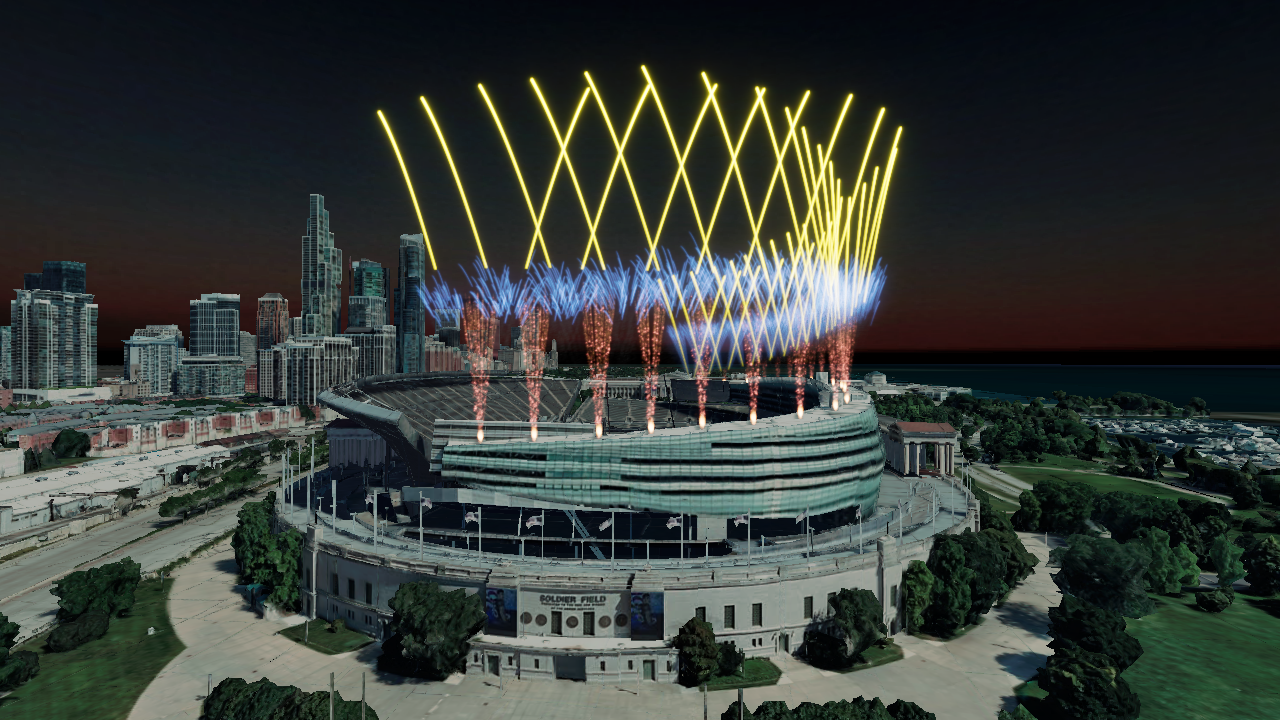
Google Maps (2D & 3D imagery)
Screenshot → -
-
-
-
360° design view
-
-
-
-
3D camera animation
-
-
-
-
+
Scripting tools
-
LIMITED
Limited
-
-
Insert empty cue
-
-
-
Insert effect
-
-
-
Replace effect
-
-
-
Angles > Make into fan
-
-
-
Angles > Mirror angles
-
-
-
Angles > Straighten
-
-
-
Angles > Rotate cakes 180 degrees
-
-
-
Sequences > Make into sequence
-
-
-
Sequences > Spread out evenly
-
-
-
Time adjustment > Set time
-
-
-
Time adjustment > Shift times
-
-
-
Time adjustment > Stretch duration
-
-
-
Reorder > Reverse order
-
-
-
Tracks > Set track
-
-
-
Chains > Combine as chain
-
-
-
Chains > Break apart chain
-
-
-
Chains > Set chain delays
-
-
-
Chains > Set chain angles
-
-
-
Choose effect
-
-
-
Insert multiple effects
-
-
-
Angles > Make into forward/backward fan
-
-
-
Angles > Make into zigzag
-
-
-
Angles > Invert angles
-
-
-
Angles > Tilt +5 degrees
-
-
-
Angles > Tilt -5 degrees
-
-
-
Angles > Rotate +90 degrees
-
-
-
Angles >Rotate -90 degrees
-
-
-
Sequences > Spread out accelerating
-
-
-
Sequences > Spread out with ease in/out
-
-
-
Sequences > Spread out based on effect durations
-
-
-
Letters > Make into matrix letters
-
-
-
Letters > Make into vertical letters
-
-
-
Time adjustments > Add time variance
-
-
-
Time adjustments > Speed up cadence at end
-
-
-
Time adjustments > insert minimum separation
-
-
-
Time adjustments > Re-align cues to their event time
-
-
-
Reorder > Randomize order
-
-
-
Tracks > Set track to next available number
-
-
-
Tracks > Set tracks based on groups sequentially
-
-
-
Align nearly equal effect times
-
-
-
Align at earliest effect time
-
-
-
Align at earliest event time
-
-
-
Align at latest effect time
-
-
-
Align at latest event time
-
-
-
Align event times to frame rate
-
-
-
Align effect times to frame rate
-
-
-
Hide/unhide items in script
-
-
-
Duplicate selected effect(s)
-
-
-
Duplicate into pairs
-
-
-
Duplicate into flights
-
-
-
Duplicate into chains
-
-
-
Duplicate with offsets
-
-
-
Duplicate again with same offsets
-
-
-
Group items to organize the timeline and script
-
-
-
-
+
Import script functions
-
LIMITED
Limited
-
-
Import scripts from Cobra CSV, Generic CSV, Finale Business HBS
-
-
-
Import scripts from Explo SHW, FireOne FIR, Galaxis GS2, Pyromate SmartShow, Pyrotronix PTX and Show Director SCX
-
-
-
-
+
Export functions
-
LIMITED
Limited
-
-
Export soundtracks (WAV)
-
-
-
Export any report as a PDF, XLSX, TXT or CSV file.
-
LIMITED
PDF only
-
PDF, XLSX, TXT, CSV
-
PDF, XLSX, TXT, CSV
Export any window as XLSX, CSV, or TXT file
-
-
-
Export voice cues track
-
-
-
Export effects in multiple formats including Finale 3D, Finale Inventory, XLSX, CSV and TXT
-
-
-
Export script as Show Director CSV
-
-
-
Export all show data tables as combined CSV
-
-
-
-
+
Addressing
-
LIMITED
30 sorting options + 1 wiring option for modules
-
LIMITED
Wiring options limited by lack of graphical rack layout
-
Limitless sorting options, wiring options for modules, stats, pins and racks
Allow multiple e-matches on each pin
-
-
-
Choose start module
-
-
-
Lock & unlock addresses
-
-
-
Re-address selected positions
-
-
-
Fill down addresses in script window
-
-
-
Set custom module specification
-
-
-
Universes (unique firing systems)
-
-
-
Sections (set of positions that share modules)
-
-
-
Multiple module types
-
-
-
Create addressing blueprint
-
-
-
Edit addressing blueprint
-
-
-
Address show using single blueprint
-
-
-
Address show using blueprints assigned to positions
-
-
-
-
Multi-lingual support
-
-
-
-
Show startup template
-
-
-
-
Window layout presets
-
LIMITED
1 window layout, no custom presets
-
3 built-in layouts + 3 custom presets
-
3 built-in layouts + 3 custom presets
-
Custom table layouts
-
LIMITED
No custom table layouts
-
Unlimited custom table layouts
-
Unlimited custom table layouts
-
Print batches of PDF reports, labels, & diagrams
-
-
-
-
Update Per-show effects
-
-
-
-
Paste clipboard into effects window, add or update
-
-
-
-
Delete unreferenced Per-show effects
-
-
-
-
Custom Effect collection presets
-
-
-
-
+
Inventory productivity features
-
-
-
Copy on hand quantities to quotas
-
-
-
Copy available quantities to quotas
-
-
-
Subtract used quantities from available
-
-
-
Subtract used quantities from quotas
-
-
-
Break apart assortment quotas
-
-
-
Clear quotas
-
-
-
-
Unlimited Undo/Redo
-
-
-
-
Cut, Copy and Paste, Select all
-
-
-
-
7 'Paste special' commands for events, songs and models
-
-
-
-
5 'Select special' commands for events and positions
-
-
-
-
Keyboard shortcuts
Learn more → -
-
-
-
Set show information
-
-
-
-
Set show duration
-
-
-
-
5 Effect time formats
-
-
-
-
8 Timeline snap-to resolutions
-
-
-
-
4 Angle format conventions
-
-
-
-
Display addresses with dash between rail and pin
-
-
-
-
11 Position layout snap-to resolutions
-
-
-
-
10 Cue flag and script row color mapping options
-
-
-
-
4 Module counts and pin warning dot label options
-
-
-
-
7 Pin counts on positions label options
-
-
-
-
4 Module counts on position label options
-
-
-
-
Hide trajectory dots when not selected
-
-
-
-
Draw trajectory dots instead of effect simulations
-
-
-
-
Draw chains on timeline as multiple rows
-
-
-
-
Hide playback clock
-
-
-
-
Snap cues and events
-
-
-
-
Disable speed of sound delay
-
-
-
-
Disable price indicator in design view
-
-
-
-
Loop playback
-
-
-
-
Automatically create position groups
-
-
-
-
Hide all position rulers
-
-
-
-
Hide position arrow in rack layout view
-
-
-
-
Add a position
-
-
-
-
Rename positions
-
-
-
-
Add multiple positions simultaneously
-
-
-
-
Rotate and orient positions in any direction
-
-
-
-
Straighten line of positions
-
-
-
-
Lengthen or shorten line of positions
-
-
-
-
Scale arrangement of positions
-
-
-
-
Project positions on their down axis to nearest surface
-
-
-
-
Raise positions to match the highest
-
-
-
-
Set position heights
-
-
-
-
Raise position heights
-
-
-
-
Arrange positions into a line, circle, square or grid
-
-
-
-
Select next position
-
-
-
-
Select previous position
-
-
-
-
Select positions by name
-
-
-
-
Create position group
-
-
-
-
Lock positions in place
-
-
-
-
Hide position name labels
-
-
-
-
Fix position names (invisible effects)
-
-
-
-
Render settings
-
-
-
-
9 different currency symbols
-
-
-
-
Chain price is for entire chain
-
-
-
-
Chains count as one in 'used' and 'quantity' columns
-
-
-
-
Show ruler distances in feet instead of meters
-
-
-
-
Use A4 page size for all reports and diagrams
-
-
-
-
Easy racks settings
-
-
-
-
Set click action for effects window
-
-
-
-
Set click action for other windows
-
-
-
-
Set timeline playback scrolling margin
-
-
-
-
Set timeline right margin for editing
-
-
-
-
Set timeline response for clicking row in script
-
-
-
-
Turn voice cues ON for playback
-
-
-
-
One voice cue per track
-
-
-
-
Disable UI sound effects
-
-
-
-
Paste events with rail, pin, and rack addresses
-
-
-
-
Use 'cost' instead of 'price' for total amount shown in 3D view
-
-
-
-
Swap insert empty cue and play keys (i and space)
-
-
-
-
Add racks with smallest on the left
-
-
-
-
Disable automatic rack part number annotations
-
-
-
-
Reverse tube loading order on alternating racks
-
-
-
-
Hide cue flags entirely unless selected or hovered over
-
-
-
-
Hide cue flag numbers unless selected or hovered over
-
-
-
-
Timeline waveform uses flat colors
-
-
-